Requiring 2FA for package publishing and settings modification
Table of contents
All packages now require two-factor authentication (2FA) or a granular access tokens with bypass 2FA enabled for creating and publishing packages.
Modifying a package's settings also requires two-factor authentication (2FA).
For CI/CD workflows, consider using trusted publishing, which provides secure, token-free publishing that automatically enforces strong authentication without requiring manual token management.
Important notes about granular access tokens:
- Bypass 2FA configuration is set at token creation
- When bypass 2FA is disabled: The system will check account-level and package-level settings to determine if 2FA is required
- When bypass 2FA is enabled: The token will bypass 2FA requirements for publishing, regardless of account-level or package-level 2FA settings
- Bypass 2FA never applies to account-identity or account-governance actions (changing email or password, modifying 2FA configuration, viewing or generating recovery codes, creating or escalating tokens, or adding and removing maintainers). Those actions always require an interactive 2FA challenge. For more information, see "About access tokens."
- When Require two-factor authentication and disallow tokens is selected at the package level, granular access tokens cannot be used regardless of their bypass 2FA setting
Configuring two-factor authentication on package settings
-
On the npm "Sign In" page, enter your account details and click Sign In.
-
Navigate to the package on which you want to require a second factor to publish or modify settings.
-
Click Settings.

-
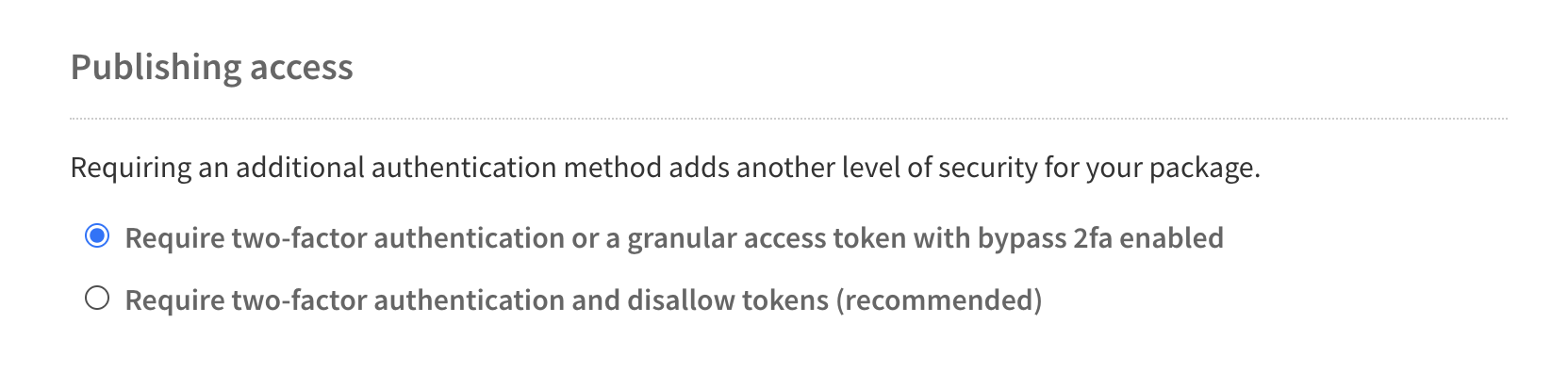
Under "Publishing access", select the requirements to publish a package.
- Require two-factor authentication or a granular access token with bypass 2fa enabled (Default)
This is the default option for all new packages. With this option, maintainers must have two-factor authentication enabled for their account. If they publish a package interactively, using thenpm publishcommand, they will be required to respond to a 2FA prompt when they perform the publish. However, maintainers may also create a granular access token with bypass 2FA enabled and use that for a non-interactive publish. - Require two-factor authentication and disallow tokens (Recommended) With this option, a maintainer must have two-factor authentication enabled for their account, and they must publish interactively. Maintainers will be required to respond to a 2FA prompt when they perform the publish. Granular access tokens cannot be used to publish packages, regardless of their bypass 2FA setting.
- Require two-factor authentication or a granular access token with bypass 2fa enabled (Default)
5 . Click Update Package Settings.


![dependabot[bot]](https://github.com/dependabot[bot].png?size=40)


